Watchdoc - Catch Watchdoc spools - Procedures
The spool capture procedure differs depending on the reproducibility of the anomaly.
Catch spools for a reproductible anomaly
To activate the spool catch in order to analyse it:
-
access the print server as an administrator ;
-
launch the Print Management Tool and click Print Servers> Printers to access the device list;
-
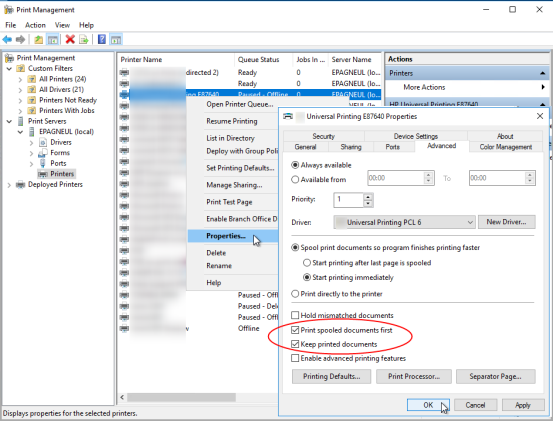
in the Printers list, click right on the failing device name, then click on Properties;
-
in the device properties window, on the Advanced tab, tick the Keep the printed documents box,
-
then click on the device properties window, under the Advanced tab, check the Keep printed documents box and then, click the OK button to apply the archiving of the print-jobs generated by this device:
-
as soon as the archive is activated, the MS Windows® spooler generates a file in SPL / SHD format and saves it in the c: \ Windows \ system32 \ spool \ PRINTERS folder by default;
-
retrieve the SPL file corresponding to the date of the print test and send it to the Doxense® Support who will be able to analyze it;
-
after saving the SPL file, repeat the configuration operation to clear the Keep Printed Documents check box.
Catch spools for a non-reproductible anomaly
In the case of a non-reproductible anomaly:
-
make a screenshot of the Watchdoc counters on which the anomaly is visible;
-
make a screenshot of the device counters;
-
follow this process to activate the archiving of the print-jobs: this action keeps all the spools selected by the filter to understand which documents have not been counted correctly.