WES Ricoh - Renewal of the Access Token before expiration
January 2024
Context
When Watchdoc uses a Ricoh WES, it may occur that an alert message indicates that the access token will soon expire and invite you to contact your retailer:
Resolution
This issue can be solved by the update of Watchdoc.
If the Watchdoc update is not possible, the issue can be solved by the manual modification of the Watchdoc configuration file.
Procedure
To modify the Watchdoc configuration file:
-
log in to the server that hosts Watchdoc as an administrator and shut down the Watchdoc service;
-
search the config.xml file (saved by default in C:\Program Files\Doxense\Watchdoc\Data\config.xml);
-
copy the config. xml file to save it;
-
open the config. xml with a text editor and seach the tag <ricoh-web-api>.
-
If this tag doesn't exist, create it under the <instances><default-instance> tag;
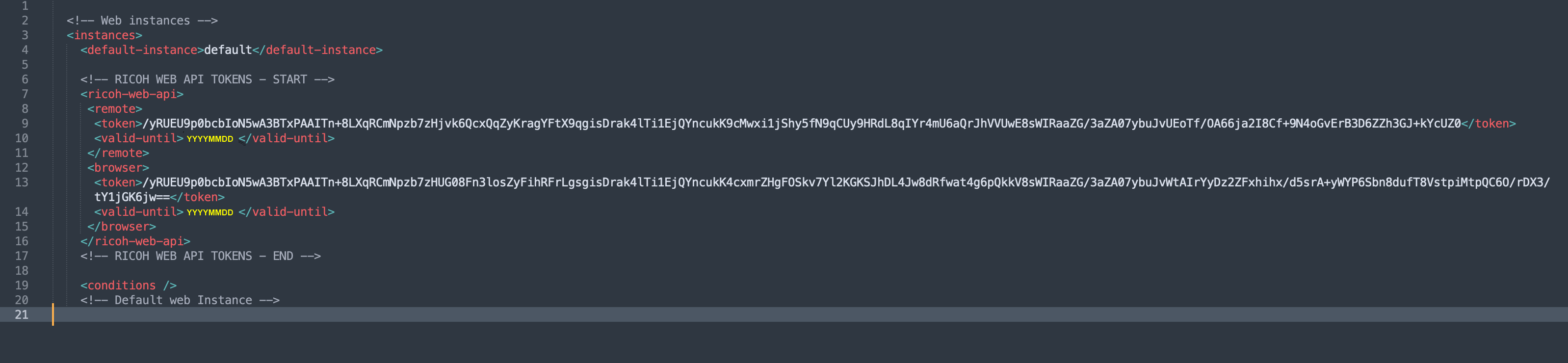
modify the tags included in this tag as follows:
<ricoh-web-api>
<remote> <token>/yRUEU9p0bcbIoN5wA3BTxPAAITn+8LXqRCmNpzb7zHjvk6QcxQqZyKragYFtX9qgisDrak4lTi1EjQYncukK9cMwxi1jShy5fN9qCUy9HRdL8qIYr4mU6aQrJhVVUwE8sWIRaaZG/3aZA07ybuJvUEoTf/OA66ja2I8Cf+9N4oGvErB3D6ZZh3GJ+kYcUZ0</token>
<valid-until>20260123</valid-until>
</remote>
<browser>
<token>/yRUEU9p0bcbIoN5wA3BTxPAAITn+8LXqRCmNpzb7zHUG08Fn3losZyFihRFrLgsgisDrak4lTi1EjQYncukK4cxmrZHgFOSkv7Yl2KGKSJhDL4Jw8dRfwat4g6pQkkV8sWIRaaZG/3aZA07ybuJvWtAIrYyDz2ZFxhihx/d5srA+yWYP6Sbn8dufT8VstpiMtpQC6O/rDX3/tY1jGK6jw==</token>
<valid-until>20260123</valid-until>
</browser>
</ricoh-web-api>
- As in the following example:
5. save the config.xml file;
6. restart the Watchdoc service;
7. in the Watchdoc administration web site, check that the access token alert message no longer displays.